
LLMGuardby HACS
How LLMGuard works,
part by part.
LLMGuard stops confidential information being sent to AI services. An agent on each Windows device finds the requests going to AI services, and the Policy Engine, installed on your own hardware, decides each one before it reaches the provider. This page covers each part, what your administrators work with, what is recorded, and what LLMGuard does not do.
01 / THE ENDPOINT AGENT
The agent opens AI traffic
and leaves the rest sealed.
The agent runs beneath every application, at the network layer of each Windows device. It recognises requests going to AI services, whichever application makes them, holds each one, and passes it to your Policy Engine for a decision. Everything else leaves the device as it always did.
| From | To | What the agent does |
|---|---|---|
| Browser | chat.openai.com | AI service. Held and sent for a decision |
| IDE coding assistant | api.anthropic.com | AI service. Held and sent for a decision |
| Desktop AI app | claude.ai | AI service. Held and sent for a decision |
| Command-line agent | api.openai.com | AI service. Held and sent for a decision |
| Script using an SDK | generativelanguage.googleapis.com | AI service. Held and sent for a decision |
| Your CRM, on the same cloud | crm.your-company | Not an AI service. Left sealed |
| Browser | Online banking | Not an AI service. Left sealed |
| Mail client | Your mail server | Not an AI service. Left sealed |
- Detection only
- The agent classifies nothing. Content is examined in your Policy Engine, never on the device.
- More than 50 AI services
- Recognised out of the box. New ones arrive by signed update from the HACS registries, with nothing reinstalled.
- A readable refusal
- When a request is blocked, the person sees why, and the application receives a clear blocked-by-policy response instead of hanging.
- No application changes
- No SDK, no proxy settings, no developer work. Allowed requests, including streamed replies, behave as they did before.
02 / THE POLICY ENGINE
What your administrators work with,
screen by screen.
The Policy Engine is installed on a server in your environment, and every decision is made there. It compares each request with what your organisation has said is confidential, decides it, and records it. Your security or IT team runs it day to day.
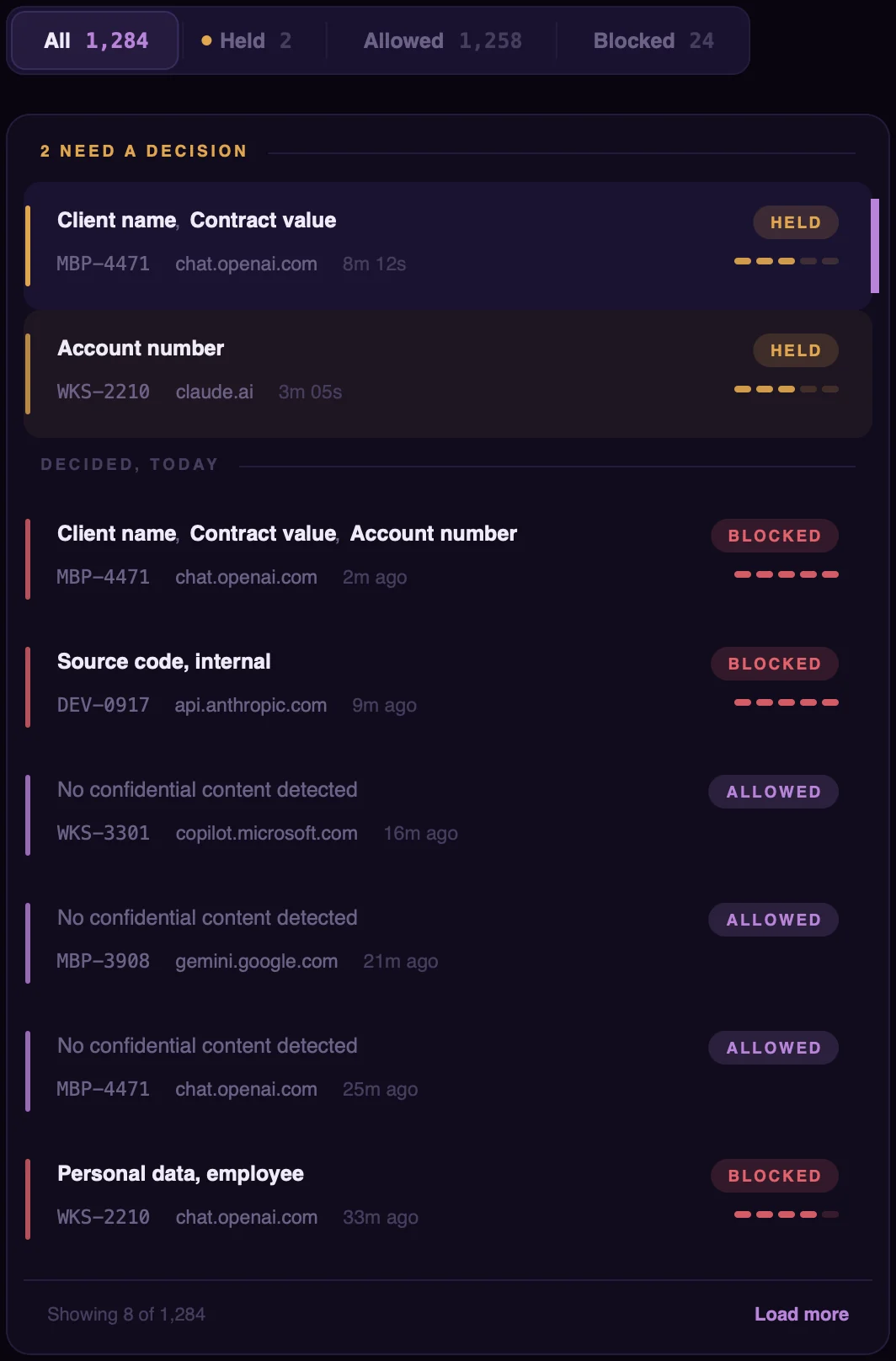
01Requests
Which requests need a decision from me?
Every request the agent forwards, with what was detected in it and how it was decided. Requests the engine was unsure about wait at the top for someone on your team to approve or reject. IT is notified when a request is blocked.
02Company Context
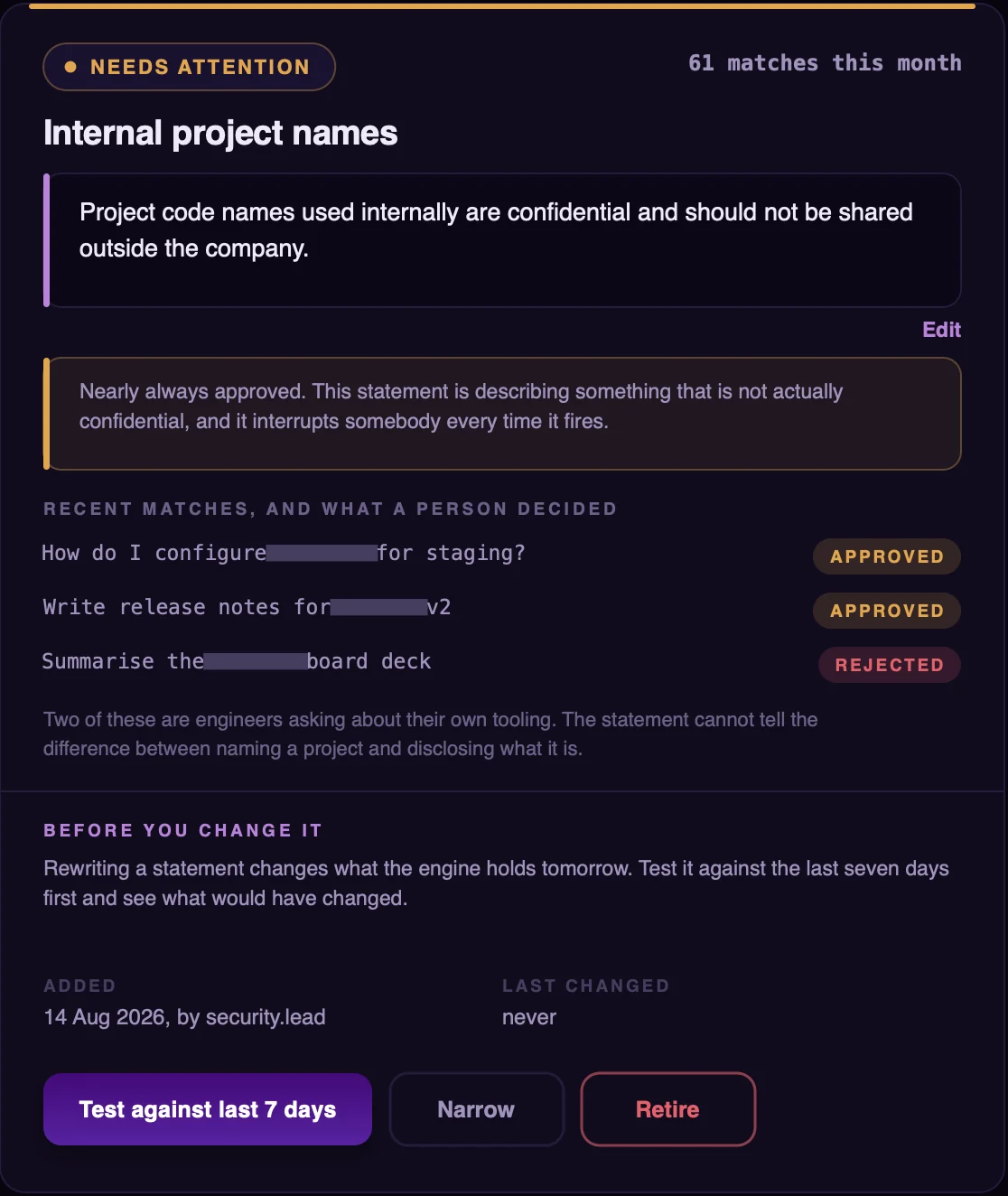
What does our organisation treat as confidential?
Your team writes it down in plain sentences: client names and contract values, internal project names, source code from internal repositories. Each request is compared with these statements for meaning, not only keywords. The screen shows how often a person disagreed with each one, so a statement that keeps being overruled can be narrowed.
03Settings
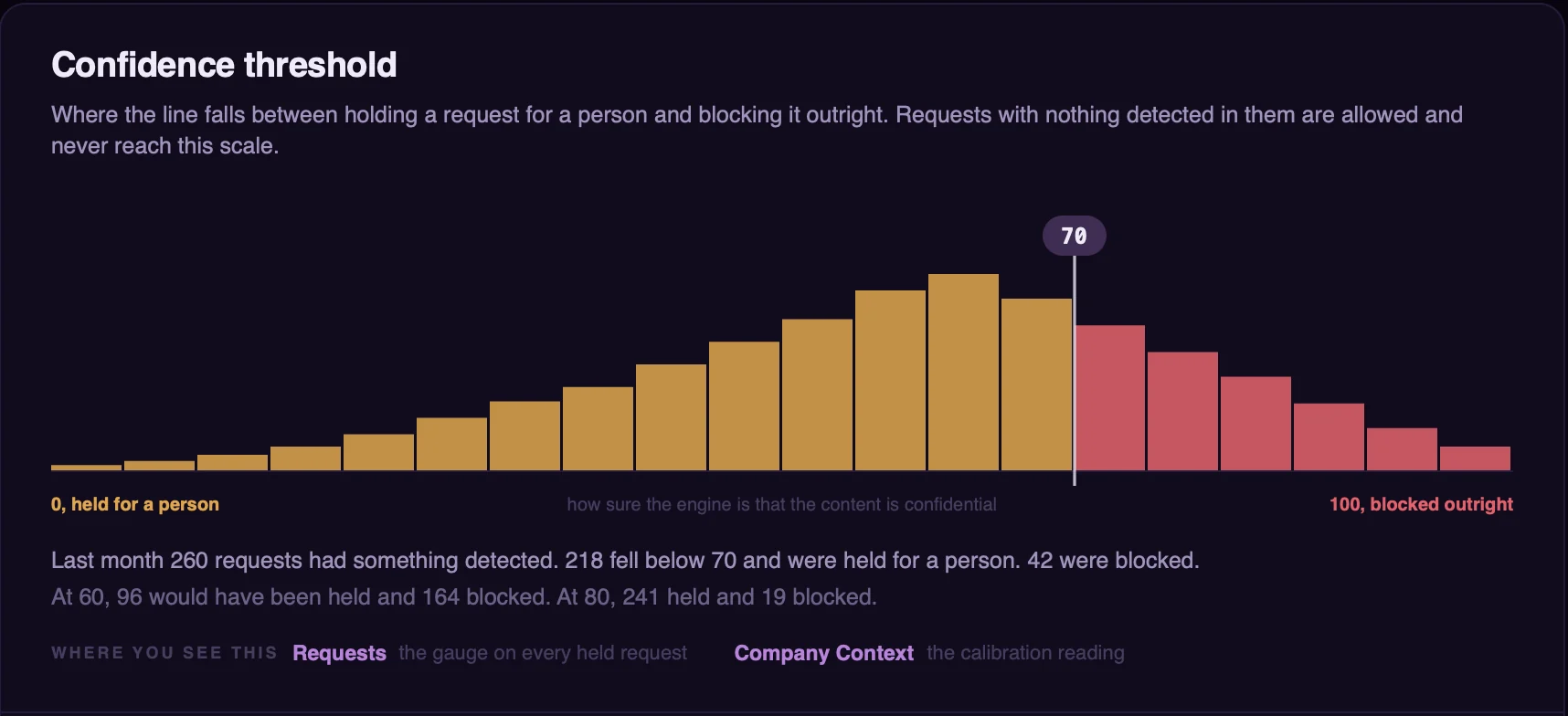
Where does holding end and blocking begin?
When something confidential is detected, the engine’s confidence decides what happens next. Below your threshold, the request is held for a person. Above it, the request is blocked. You set the threshold, and the screen shows what a different setting would have done last month.
04Exceptions
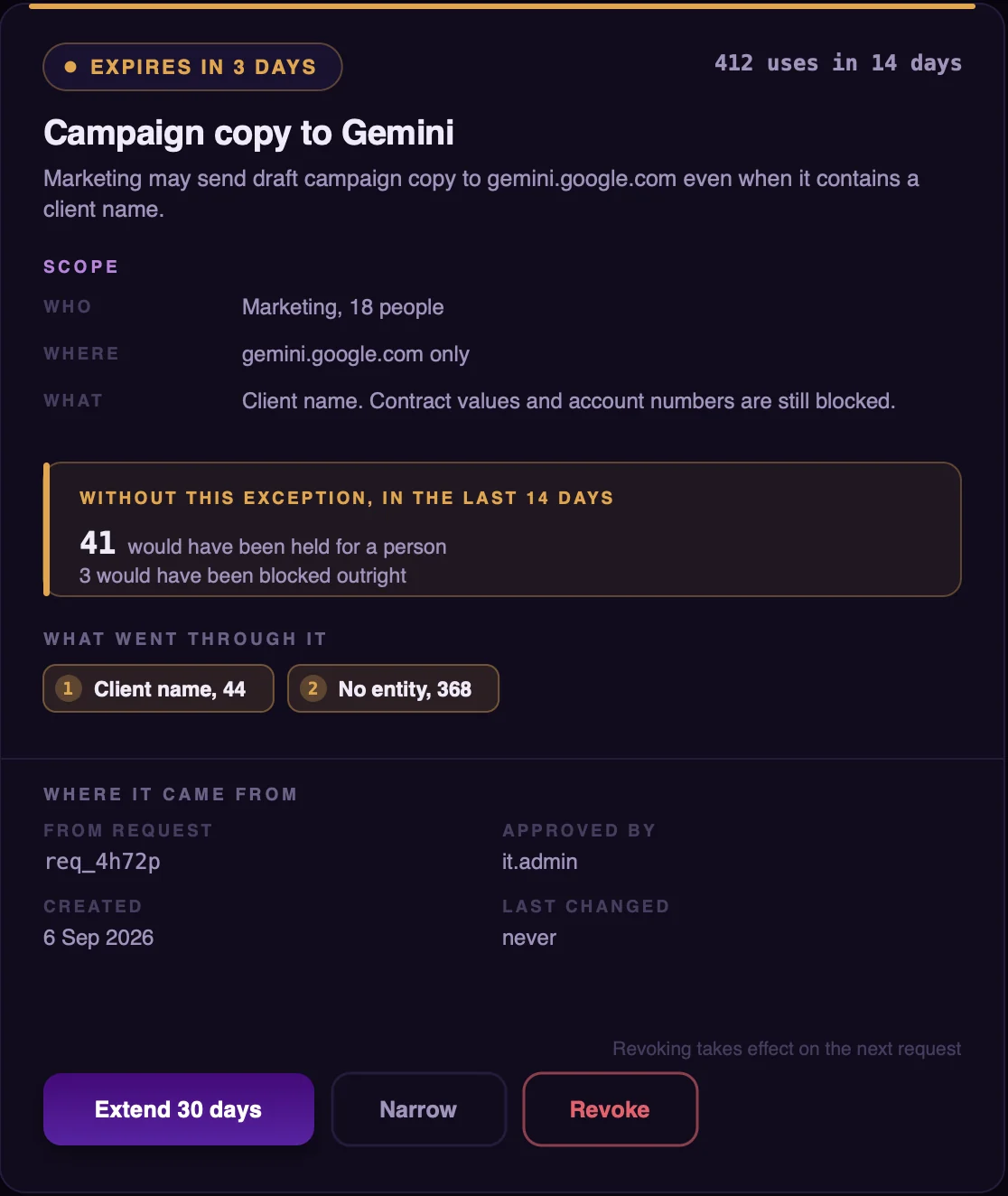
What have we chosen to allow?
A standing permission for one team, one AI service and one kind of content, such as marketing sending draft campaign copy to one service. Each shows how much traffic it lets through and when it expires. Approving a held request can become an exception, which then applies to later requests.
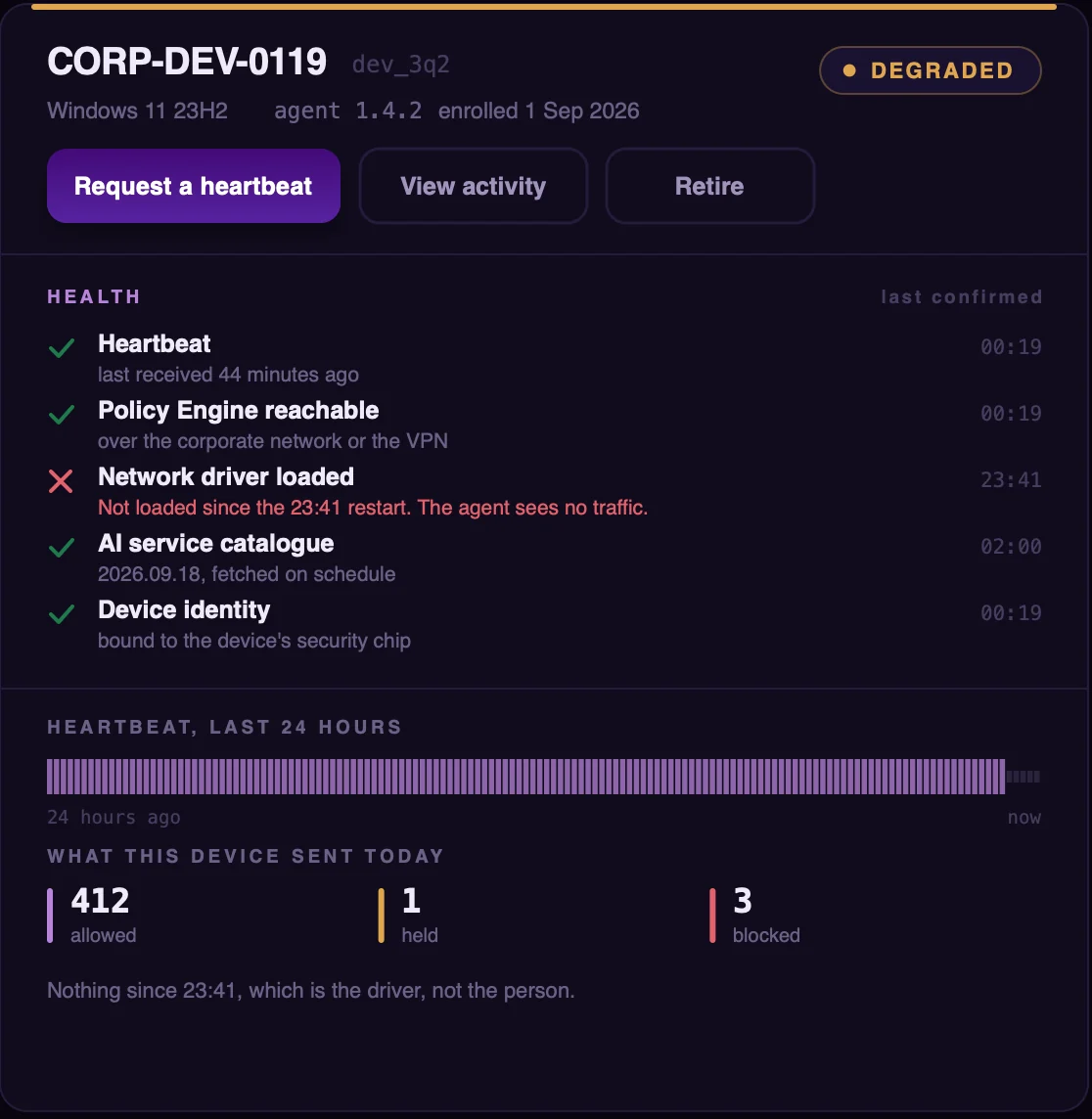
05Agents
Is every device protected?
Each device reports its health: whether it can reach the engine, whether its network driver is loaded, whether its catalogue of AI services is current, and that its identity is bound to its security chip. Devices that are degraded or offline are listed first, with the reason.
06Audit Log
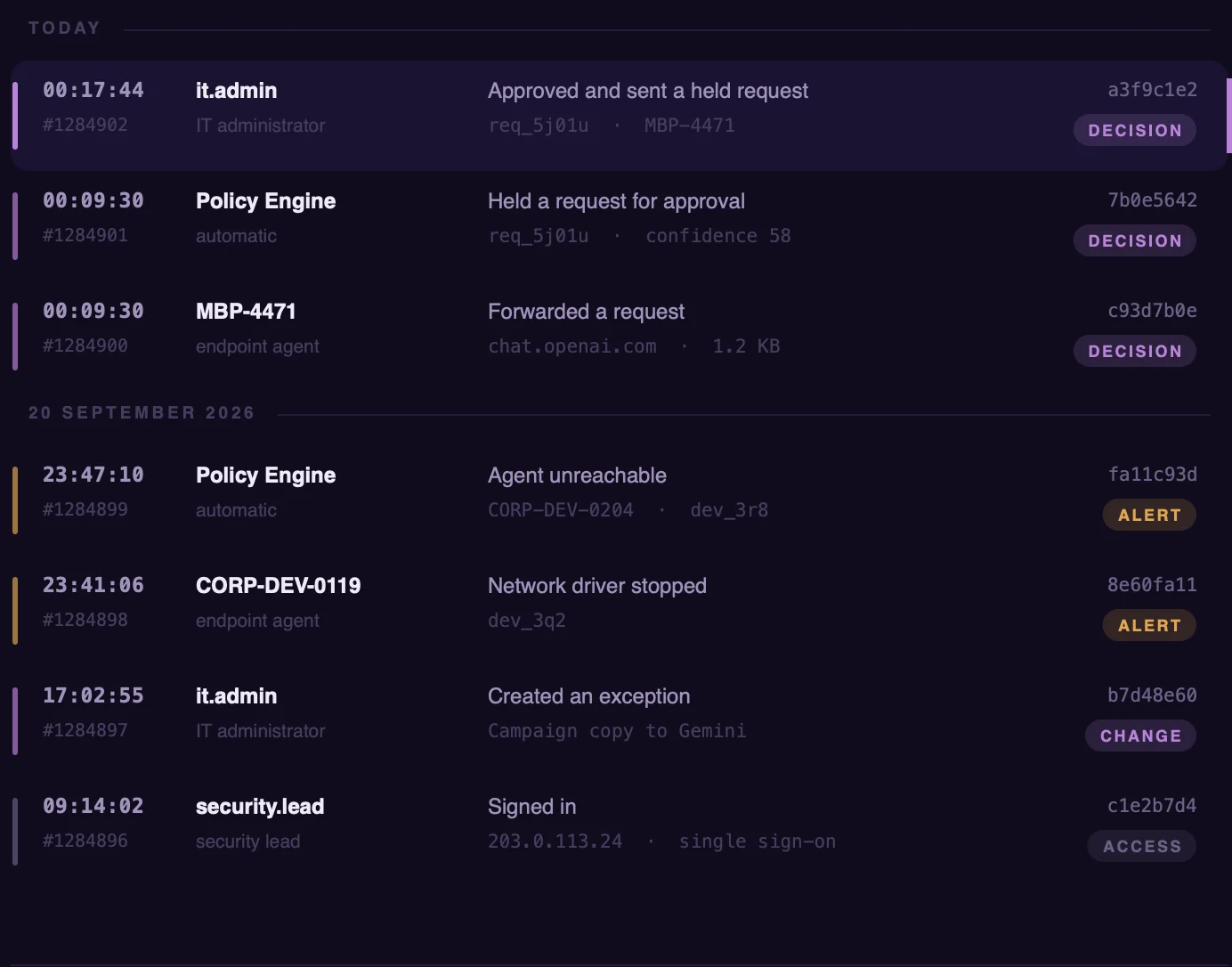
What happened, and who did it?
Every decision, every change to policy and every sign-in, with the device, the AI service and a fingerprint of what was sent. The record stays in your environment.
03 / WHAT IT COVERS
It works alongside your endpoint security and DLP tools.
LLMGuard covers the one channel they were not built for: what your people send to AI services. It does not try to be anything else, so here is exactly where it stops.
LLMGuard decides
Requests to AI services from
- Browsers
- IDE coding assistants
- Desktop AI apps
- Command-line agents
- Scripts
- SDK and API calls
Left to your other tools
LLMGuard does not watch
- File servers
- SharePoint and OneDrive
- Personal Gmail
- General uploads in the browser
- Threats on the device, which is your endpoint security’s job
Limits worth knowing
- Windows at launch
- The agent runs on Windows devices managed through Intune or similar.
- It needs your network
- Devices reach the Policy Engine on your network or over your VPN. When they cannot, your outage setting applies.
- It needs a server
- The Policy Engine runs on your hardware, to the requirements we give you.
04 / SECURITY AND PRIVACY
Every connection it makes,
and what travels on each.
Request content goes from the device to your Policy Engine and nowhere else until it has been allowed. The only connection to HACS carries authentication and updates, and it is made from your side.
| From | Direction | To | What travels |
|---|---|---|---|
| Device | to | Your Policy Engine | The content of each request to an AI serviceOn your network or over your VPN |
| Your Policy Engine | to | Device | The decision: allowed, held or blockedThe agent enforces it |
| Device | to | AI provider | Allowed requests onlyUnchanged, as before |
| Device | to | HACS | Authentication, a configuration file and the signed AI service catalogueConnects out. No customer content. |
| HACS | to | Your network | NothingHACS does not connect in |
Device identity
- Each device proves its identity with its built-in security chip, so a cloned disk or a stolen credential cannot impersonate it.
- No passwords or long-lived keys are stored on the device. Device credentials rotate daily.
- Enrolment tokens work once.
Your people
- Only traffic to AI services is opened. Banking, health, personal and all other traffic is left sealed.
- Provider API keys inside a request are masked before its content is examined.
- A person whose request is blocked is told, in plain language, at the moment it happens.
The record
- Every decision is logged: which device, which AI service, what was decided, and a cryptographic fingerprint of what was sent.
- The log, the prompts and the documents stay in your environment. None of it is sent to HACS.
05 / QUESTIONS
Questions security teams ask.
If yours is not here, email us and a person on the team that builds LLMGuard will answer.
Does it replace our DLP?
No. LLMGuard covers one channel, what your people send to AI services, and works alongside your endpoint security and DLP tools. It does not watch email, file servers, workspace tools such as SharePoint or OneDrive, personal Gmail, or general uploads in the browser.
What does HACS receive from us?
The agent connects out to HACS to authenticate and to download a configuration file and the signed catalogue of AI services. No documents, prompts, logs or telemetry are sent to HACS, and HACS does not connect into your network.
Where are the models trained?
On site, in your environment, on your own material, by our deployment team. Later training iterations happen on site too. We do not describe the models or the training method publicly.
What happens when a device is off the network?
The agent needs to reach your Policy Engine for a decision, on your network or over your VPN. When it cannot, the setting you chose in advance applies: AI traffic pauses, or it continues without a decision.
What happens to a held request?
It waits in the Policy Engine for someone on your team to approve or reject it. Approvals and rejections can become policy, which then applies to later requests.
How accurate is it?
We do not publish accuracy figures. The evaluation in your own environment is where you judge it, on your own requests, and anything the engine is unsure about is held for a person rather than decided automatically.
Will our applications notice?
Allowed requests, including streamed replies, behave as they did before. A blocked request gets a readable blocked-by-policy response, so applications do not hang. No SDK, proxy settings or developer work is needed.
Which devices does it run on?
Windows devices at launch, managed through device management such as Microsoft Intune. We confirm the details for your environment when we agree the plan.
How long does setup take?
It depends on your environment. We agree the plan, and what your team provides, before anything is installed.
What does it cost?
Pricing is not published yet. Two selected organisations will receive a pilot with HACS setup and evaluation fees waived. HACS also covers accommodation; customers provide the required hardware. Other deployment expenses will be discussed and agreed in writing before starting.
EARLY ACCESS
Pilots in India,
the UAE and Qatar.
Early-access organisations have LLMGuard installed in their own environment by our team, and evaluate it on their own requests.
What you will need
- Windows devices, managed through Intune or similar
- A server for the Policy Engine
- Devices that reach it on your network or VPN
- An IT contact for installation and coordination